




HUAWEI Petal Search Review Article Contest - Ooi Guo Shen
Knowing that HUAWEI had just recently launched their very own search engine, I quickly hopped on the bandwagon and started using it as my main search engine for my daily use. At first, I did not hold much expectation as I believed that a newly launched search engine would not serve as good as other well-established search engines. However, my first experience with Petal Search was certainly an amusing one as I found it to be quite on par with even Google Search!
In general, I find the user interface of Petal Search to be very user-friendly. I faced little trouble changing my search region settings from the default United Kingdom to Malaysia and started exploring its functions. It is rather pleasing to note that the Petal Search webpage is very clean and simple, providing great aesthetics, soothing to the eyes. More importantly, those who are not tech-savvy (like my 10 year-old younger sister and 80 year-old grandfather) are able to effortlessly find everything they need on Petal Search without needing any help from others, all thanks to the straightforward design of Petal Search.
I truly like how customisable the home screen can be for users to add “cards” according to their likes and needs, and I find them greatly useful too! For example, the weather card tells me whether I need to grab an umbrella when I go out today, the currency converter card for easy access to the rough conversion rates today, while the what’s in the news card keeps up quickly abreast with recent happenings in Malaysia from reliable sources such as Malaysiakini, The Star and New Straits Times. For more detailed new reading, the news tab in the search function even allows me to customise date ranges and specify the source (which I believe is not found in any other search engine, at least for those that I had used before!), making research work easier especially when I’m looking into news released in a specific period of time. (see pic 1)

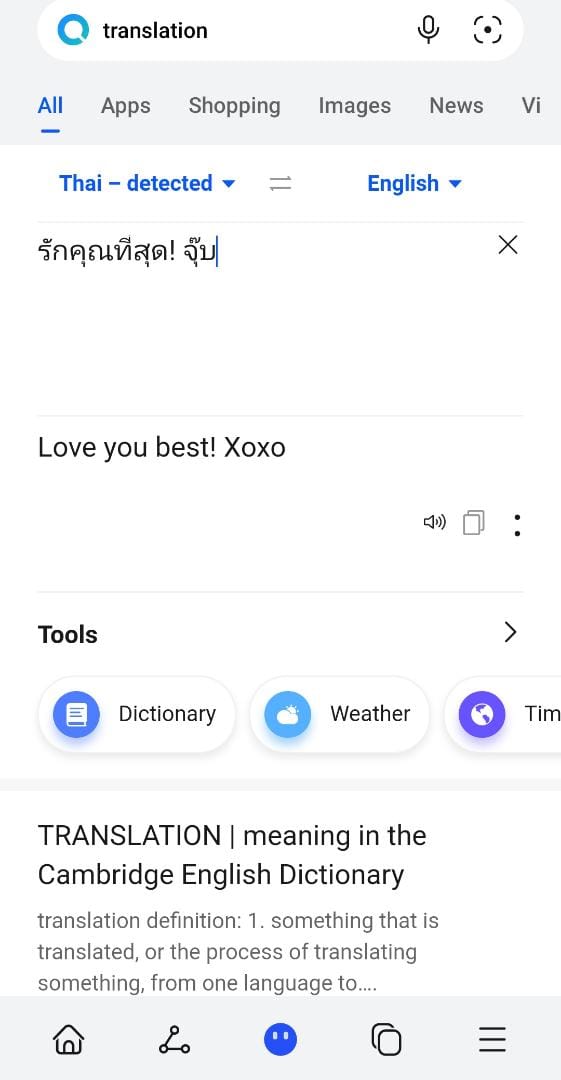
If you rely a lot on translation service, you definitely do not want to miss this out! Having friends who always type in Thai, translating work is easier now with Petal Translate! Most importantly, I was definitely surprised and shocked by the ability of Petal Translate to also translate even Thai internet slang (see the second image!). All in all, after experimenting with Bahasa Malaysia, Thai language and also Chinese, I think that the translation is able to accurately capture the nuances from the native language to English.
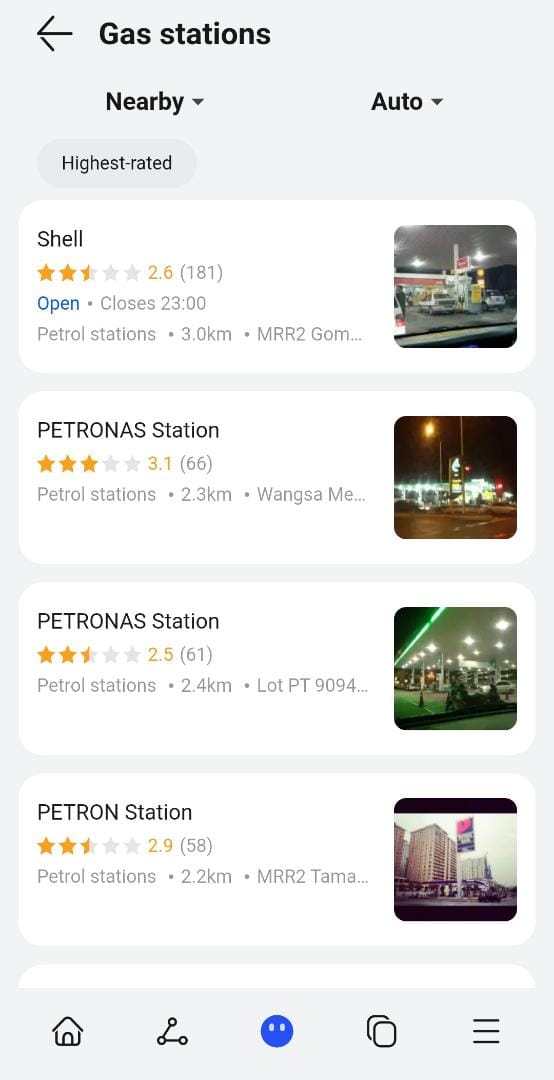
When on the move, and facing trouble with where to dine in or where’s the nearest local gas station, Petal Search is also the great rescue companion to have. Just click “nearby” and then “restaurants”, “cafe” or “gas stations” (or any of the other categories according to your circumstance) and case solved (pic 3).
Allow me to also share my experience using one of the highlights of Petal Search which every student will need to survive university life – Petal Scholar! I am on top of the world to learn that Petal Search has this feature which allows me to search for high quality peer-reviewed journal articles and academic materials. Furthermore, it also allows me to pick materials in the language I am looking for. Citations work is also made easier as Petal Scholar also helps generate citations!
For the past weeks, my experience in using Petal Search is indeed a pleasant one and I am glad that I gave it a chance at first. Surely, I can’t wait to explore more with Petal Search and make the best of it!
----------------
Writen by:
Ooi Guo Shen


Report this comment
Are you sure you want to delete this comment?
This action cannot be undone.